top of page
Second Life Viewer Buttons
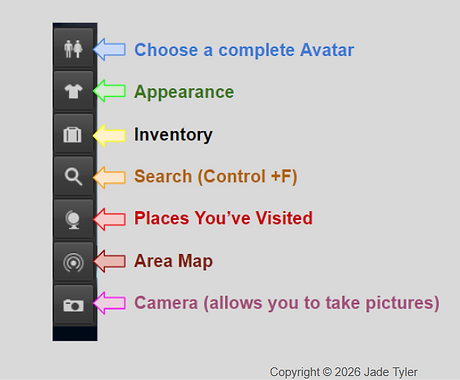
Looking at your Viewer, you will see buttons on the left and at the bottom of you screen.
Here is a short tutorial about those buttons. Scroll down to see the Firestorm Viewer Buttons.
These buttons appear on the left side of your
Second Life screen.
These buttons appear at the bottom of your
Second Life screen.

Copyright © 2025 - 2026 JadeTyler .
Unauthorized downloading, screenshots, reposting,
or use of these images are strictly prohibited.
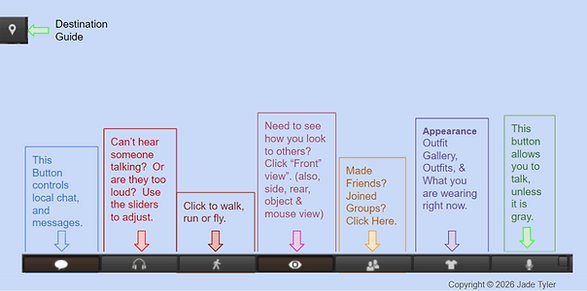
Firestorm Viewer Buttons
The Destination Guide is the only button on the Left side of your Firestorm Viewer Screen.
The rest of the buttons appear on the bottom of the screen.
You can customize them, too.


Copyright © 2025 - 2026 JadeTyler .
Unauthorized downloading, screenshots, reposting,
or use of these images are strictly prohibited.
bottom of page